Asset protection
What is a "license" in terms of Axinom DRM?
A "license" means a relatively small data packet that is needed to view/play the content. It contains the key for decrypting the content, accompanied by rules that apply for that content. For example, a license could tell the player to limit playback to a certain time frame or a certain number of views. Using our API, you can configure the restrictions that you want to apply to your content.
See also: What is DRM?
What is the content key ID?
When you protect a video with DRM, a video is essentially encrypted using an encryption key. Usually, you will generate a unique encryption key for that specific video using a key service. Each generated key gets assigned a unique Key ID (also written keyId or kid). The Key ID is a GUID; it is not a secret, and it uniquely identifies the encryption key used.
You need the Key ID when requesting a DRM license. The DRM License Service re-generates the encryption key based on the Key ID you provide and the configured Key Seed.
How do I find the content key ID?
This depends on the packaging tool you are using. Usually, such tools request a key for you and provide a way to get the Key ID's value.
There are three options:
-
Look up the Key ID in the generated manifest file. E.g., in a DASH manifest, it is a property called "KID” (or cenc:default_KID)
-
Use a Key ID Override logic: this will generate a deterministic Key ID according to a known algorithm. Refer to SPEKE Key ID Override
-
If you are using AWS Media Services, use a proxy between AWS and the Key Service to intercept and store the Key ID. Refer to SPEKE Key ID Extraction
The first approach is enough to try out the process and ensure the video plays nicely. But for production use, you will likely use some other method.
Can I use Axinom DRM to protect audio-only files?
Axinom DRM is intended as a DRM solution for video content. However, its components - Key Service and License Service - are agnostic to the type of clients and content. Audio streams included as audio tracks together with a video can be protected without any issues. This applies to all DRM technologies that we provide: Widevine, PlayReady, and FairPlay.
In case of pure audio files to which you would like to apply a typical video DRM solution, simulate them to be videos. For example, you can generate a dummy video of the same length as your audio, consisting the standard video settings. Then encode it as if it were a regular video. Note that your player should be built in a way that it would not display the video stream and would only play audio.
For encoding, you can use Axinom Encoding or any other encoding software, e.g. Shaka Packager.
Need support for DRM installation for video player.
This document explains how to prepare your FairPlay content for Axinom DRM. https://docs.axinom.com/services/drm/license-service/fairplay/#prepare-fps-content-for-axinom-drm You can prepare your DRM-protected content and prepare your player to send a license request to Axinom License service. You can find information on setting up different players here: https://docs.axinom.com/services/drm/players/video-players
You can refer to the following documentation for details on how Axinom License Service expects the license request. https://docs.axinom.com/services/drm/license-service/license-service-message Then, your player will receive a valid license from Axinom License Service, and you will be able to see a successful playback.
We are interested in user-specific, device-specific, location-specific, and time-specific restriction of playback. Does Axinom DRM support any of these?
All of these are supported. See Entitlement Message for details.
We are required to enforce output protection levels (OPL) when our content is played. Does Axinom DRM support this?
Yes. However, support for output protection differs between DRM technologies (PlayReady, Widevine, FairPlay Streaming). Using Axinom DRM, you can apply simple output protection across all technologies or address each technology separately and use it to its full extent.
Does Axinom DRM support copy protection using HDCP and CGMS-A?
Yes.
Can I find the device ID or the IP address of a device from the error logs?
Yes, of course. You can find the device details from the Errors Section. But "OmitSensitiveData" flag should be set to false for your tenant. To enable or disable the flag for your tenant, you can contact Product Support.
Is it possible to have DRM protection for live streaming not only for VOD?
Yes, you can protect your live streaming content also. When you are protecting VOD content, you have the possibility to protect your content beforehand. But when you are DRM protecting the live streaming content, you have to create, encode, package, and encrypt the content at the same time while the customer is viewing the video. You can refer to Media Live Setup to get an idea on how to achieve it with Axinom DRM.
What is the difference between using "begin_date" / "expiration_date and "start_datetime"/ "expiration_datetime" in the Axinom License service message and the entitlement message?
The "Begin_date" and the "expiration_date" is mentioned in the Axinom License service message. So the "Begin_date" and "expiration_date" is specifying the active period of the "Axinom License service message". If the Message is inactive, License Service will reject the request. The License service message consists some inner messages. Entitlement message is specified inside the License service message.
The "start_datetime" and "expiration_datetime" is mentioned inside the entitlement message, as a property for the license configuration. So "start_datetime" and "expiration_datetime" specifies the active period of the license. If "Axinom License service message" is active, regardless of the license active period, license will get generated. But license can be used only within the specified time period inside the "License configuration".
Is there any limit on Key IDs in the entitlement message?
It depends on the total AxDrmMessage header size. Max header size is ~8kb. So it depends on how big your Entitlement message is. We can say that around 100 keyIDs is the limit.
Is there any way we can stop widevine DRM playing on a VM or in a sandbox?
Here are a couple of approaches we can recommend:
-
Enforce Hardware-Level Protection (L1):
By enforcing hardware-level protection (L1) for your DRM licenses, you can restrict playback to only those devices that are capable of hardware DRM. This ensures that content cannot be played on environments that do not support hardware-based security, such as virtual machines or sandboxes.
-
Custom Client Application:
If you have a specific custom client application, you can implement environment detection to identify VM-specific characteristics. This would allow you to block playback on virtual machines or sandbox environments. However, this approach requires a custom implementation tailored to your application.
Why is it not possible to prevent screen recording in Chrome?
Google Chrome supports only Security level L3. Pure software-based CDMs (Security Level 2000 in PlayReady, Security Level 3 in Widevine) are typically unable to prevent screen recording by software tools.
Even though Firefox also uses software-based CDMs, as we know, it has a different implementation of the CDM. That could be the reason for the screen recording being prevented in Firefox.
Also in Chrome, if the "hardware accelerator" is disabled, it loses the screen protection capability.
We suggest you enforce the Entitlement message to play the content only on L1-supported devices. However, in that case, some devices can’t have a playback at all due to a lack of Security level. You can refer to DRM Protection and Screen Recording regarding enforcing the security level.
Another recommendation is to have multiple keys for SD and HD content in the same video and allow HD content to be played only when Widevine L1 is supported.
Here is the recommendation from Widevine.
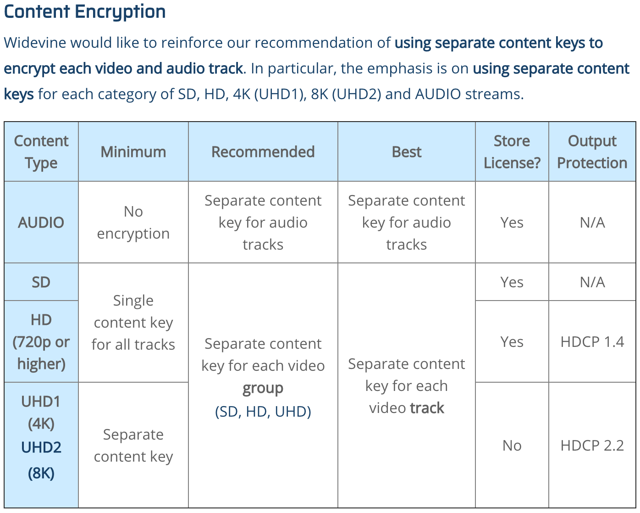
We have done some tests and we also could see that widevine L3 is allowing screen recording most of the time. Furthermore, we have seen that companies like Netflix are also dealing with the same issue, and we can see that they limit Windows Chrome L3 to 720p. In that case, some of our recommendations are,
-
For high-quality tracks/versions of content:
-
Restrict Widevine to L1 (rules out Widevine on Desktops and some phones, etc)
-
On Windows, ask users to use Edge with PlayReady (even PlayReady SL2000 seems to offer decent protection out of the box)
-
-
Create additional low-quality tracks
-
Allow these anywhere
-
Make the quality low enough so that recording is not as big of a deal. And to allow end-users who don't have Widevine L1 devices, e.g., to still watch.
-
-
Use forensic watermarking(session-based).
Please find a sample Entitlement message with usage policies.
"type": "entitlement_message",
"version": 2,
"content_keys_source": {
  "inline": [
    {
      "id": "xxxxxxxx-xxxx-xxxx-xxxx-xxxxxxxxxxxx",
      "usage_policy": "Policy A"
    },
    {
      "id": "yyyyyyyy-yyyy-yyyy-yyyy-yyyyyyyyyyyy",
      "usage_policy": "Policy B"
    },
    {
      "id": "zzzzzzzz-zzzz-zzzz-zzzz-zzzzzzzzzzzz",
      "usage_policy": "Policy C"
    }
  ],
  "content_key_usage_policies": [
  {
    "name": "Policy A",
    "widevine": {
      "device_security_level": "SW_SECURE_CRYPTO" //For Desktop Chrome
    }
  },
  {
    "name": "Policy B",
    "widevine": {
      "device_security_level": "SW_SECURE_DECODE" //For Android at least it should be SW_SECURE_DECODE. Otherwise Screen recording will be possible
    }
  },
  {
    "name": "Policy C",
    "widevine": {
      "device_security_level": "HW_SECURE_ALL"
    }
  }
]
}
Furthermore, we would like to tell you that disabling Use graphics acceleration when available on the Chrome browser will also allow screen recording.
As per 19th June 2025