Quick Start
Once you've read the introductory article, you are ready to try out Axinom DRM yourself.
Both paths below start from the same free trial and the same environment. Your environment arrives with DRM already set up: a key seed, a communication key, an evaluation FairPlay certificate, and the License Service and Key Service endpoints.
Pre-requisites
You need an Axinom Portal account to get started. If you don't have one yet, go to portal.axinom.com and start a free trial. Create your account walks you through it.
That is all you need. Your account comes with a Mosaic environment in which DRM is already enabled and configured, along with sample source videos and pre-configured processing profiles.
Choose your path
Mosaic DRM: encode and play inside Mosaic
Take this path if you want to see a DRM-protected video playing in about ten minutes, or if you plan to encode with Axinom Encoding. You do not write any code, you do not configure a license service, and you do not copy a single key.
DRM only: your own packager and player
Take this path if you already have an encoder or packager and a video player, and you want Axinom DRM as your license and key service. You will copy a few values from your environment and use them in the Axinom tools, in your packager, and in your player.
- Get your credentials and play a test stream
- Get content keys for your packager
- Integrate your player and prepare for production
Read the overview of the DRM-only path first if you want to know what to expect, including which key exchange protocols work self-service in a trial.
How the pieces fit together
Whichever path you take, three Axinom services work together:
- Axinom DRM Key Service generates content keys for the packager and returns each key with its key ID.
- Axinom Encoding, or your own packager, encrypts the video with those keys.
- Axinom DRM License Service later issues the license that lets a player decrypt the video.
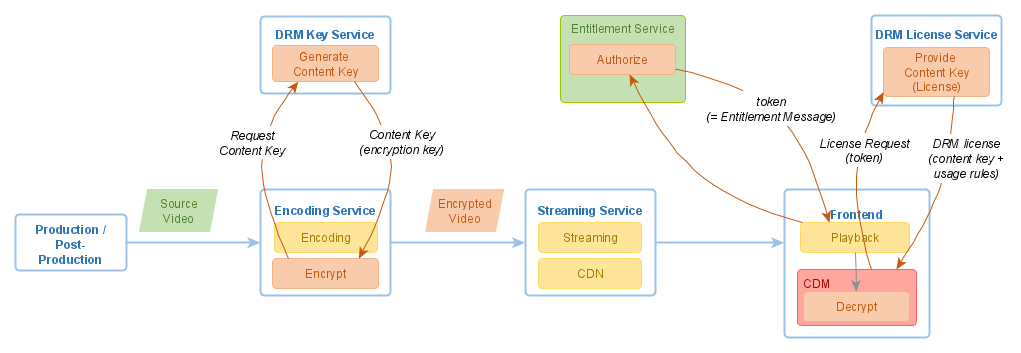
On the Mosaic DRM path, Mosaic calls these services for you. On the DRM-only path, your packager and your player call them directly.
If you want to understand the concepts behind DRM before you start, read What is DRM?. It explains licenses, content keys, and the key seed model that Axinom DRM is built on.
Next steps
- Encode a video with DRM protection (Mosaic DRM)
- Get your credentials and play a test stream (DRM only)