H265 Content with FairPlay
Introduction
H265 (HVEC) has gained quite a popularity in recent years due to its high compression and bandwidth savings. However, unlike H264 codec, H265 content cannot be rendered in older hardware. As H265 demands a hardware decoder, older devices will have to depend on the software decoders which may not able to deliver the expected results. While software decoders may able to clear H265 content, DRM protected H265 content requires specific OS and hardware support to playback.
H265 Support in Apple
Apple started supporting native playback of H265 content since 2017. However, there are both hardware and software requirements to support it.
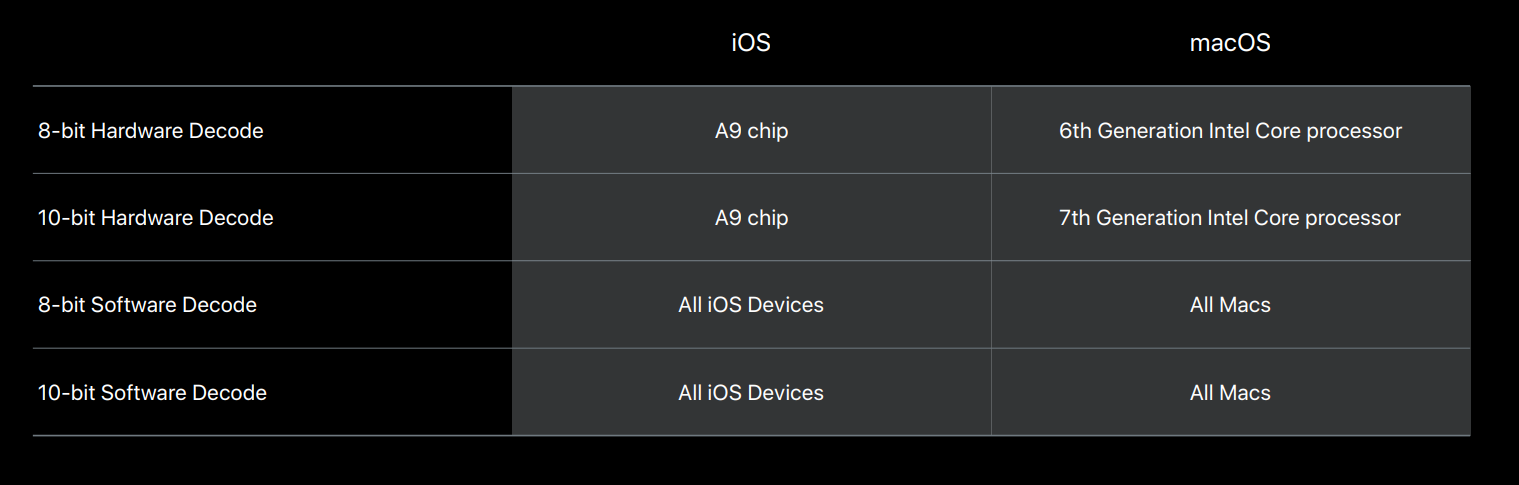
Source: WWDC2017 Keynote https://developer.apple.com/videos/play/wwdc2017/503/
Mac/MacBook With Hardware H265 Support
Any Mac with Intel 6th Gen (Sany Lake) or newer CPU along with macOS High Sierra or up will play H265 content. According to Apple devices manufactured in 2016 will generally support H265 playback. Further following devices shall support:
- Macbook – 2016 or newer.
- Macbook Pro – 2016 or newer.
- iMac – 2017 and newer.
- iMac Pro – 2017 or newer.
- 27-inch 5K iMac (2015-2017).
- MacBook Pro with AMD graphics card.
Full H265 support shall be only available from Intel 7th Gen Kaby Lake onwards. Therefore, Intel 6th gen can only play 8bit H265 content up to 1080p max resolution.
iPhone/iPad With Hardware H265 Support
For iPhones to play H265 content, iOS 11 or newer and, as stated above, an A9 chip are required. Therefore, iPhone 6s onwards should support H265 content. However, from iPhone 7 onwards, full H265 content (4K) is supported. There are some reports that iPhone 6s can play only 1080p H265 content, but our tests failed to play any protected H265 content on it. Further, the following iPad devices will also support H265 content.
- iPad Pro (1st and 2nd gen) - Full support.
- iPad Air 2 – 1080p/240 fps.
- iPad Air, and iPad mini (Retina models) – 1080p/60 fps or 720p/240 fps.
- Apple TV 4K – Full playback support.
Software Support For H265
Apple devices require macOS High Sierra or iOS 11 up to support software decoding of H265 content. As stated in WWDC2017, pre-2016 Apple devices with the required OS were able to play H265 content. However, all these content are clear (unprotected) and non of the FairPlay protected content was able to play on these devices. This behaviour has been reported by our customers as well.
Browser Support
Currently, only Safari browser is able to play H265 content https://caniuse.com/hevc.
- macOS - Safari 13+ (version 11 up should also play on High Sierra)
- iOS - Safari 11+
FairPlay DRM on H265
To play protected H265 content on Apple devices, hardware support is a must as per the tests made. Therefore, it is safe to say any FairPlay protected content can be only playable in hardware-supported devices.
However, protected H265 content still seems to be behaving somewhat unexpected on Macbook/Mac devices. There are instances even though hardware support is available for H265, protected content still fail to decode due to unsupported codec in Safari while the same video was playing in iPhones with some shuttering from time to time. Therefore, it can be suspected that this behaviour could be due to media packaging.
T2 Chip
There was speculation that T2 chip is required to play FairPlay protected content. However, it is not a requirement. Yet, Macs with the T2 chip will accelerate the H265 decoding as it has an efficient HVEC hardware decoder.
HLS Packaging Specification for H265
There are few requirements for HLS H265 media packaging to be compatible with Apple devices. Out of it, the most important is to encode media with the hvc1 codec tag. As by default ffmpeg uses hev1 which is not compatible with Apple decoders. Further, the following are more requirements.
- The container format for HEVC video MUST be fMP4. (i.e m4s)
- For maximum compatibility, some HEVC variants SHOULD be less than or equal to Main 10 Profile, Level 4.0, Main Tier. (Main 10 for 10bit & Main for 8bit).
- Profile, Level, and Tier for HEVC MUST be less than or equal to Main 10 Profile, Level 5.1, High Tier.
A typical codec string would be “hvc1.1.6.L120.90” in the manifest and having L60, L63, L90, L93, etc. will not be an issue. These corresponds to the profile levels 1,2,3,3.1,4.0,4.1,5.0, etc.
Full specification can be found at: https://developer.apple.com/documentation/http_live_streaming/hls_authoring_specification_for_apple_devices#2969487
Tested Devices
| Device Model | Hardware Support | OS and Safari Version | FairPlay Protected H265 | Clear H265 |
|---|---|---|---|---|
| Macbook Air 2012 | No | High Sierra 10.13.6, Safari 13.1.2 | No | Yes |
| Macbook Pro 2014 | No | Big Sur 11.1, Safari 14.0.3 | No | Not Tested |
| MacBookPro 2015, Intel 4th Gen | No | Catalina 10.15.7, Safari 14.0.3 | No | Yes |
| MacBook Pro 2016, Intel 6th Gen Sandy Lake | Yes (Partial) | Big Sur 11.0.1, Safari 14.0.1 | Yes | Not Tested |
| MacBook Pro 2017, Intel 7th Gen Kaby Lake (No T2 chip) | Yes | Big Sur 11.2, Safari 14.0.3 | Yes, Some failed to play | Yes |
| MacBook Air 2020, M1 Processor | Yes | Big Sur 11.1, Safari 14.0.1 | Yes, Some failed to play | Not Tested |
| iPhone 6 | No | iOS 12 | No | Yes |
| iPhone 6s | Yes (in theory) | iOS 14.4 | No | Yes |
| iPhone 7 | Yes | Yes | Yes | |
| iPhone 12 Max | Yes | iOS 14.3, Safari 14.0.3 | Yes | Yes |
last updated: 18th June 2024