Integrating Encoding with DRM
The Encoding Service protects the videos to be used with the major DRM technologies, such as Widevine, PlayReady, and FairPlay. All DRM technologies use the AES encryption with a 128-bit Content Key.
Protecting Videos in Mosaic
The easiest way to protect your videos is to let Mosaic do it for you. The Mosaic DRM Service and the Video Service are built to work together, so protecting content is a switch rather than an integration project:
| Step | Where |
|---|---|
| 1. Enable the DRM Service for your environment | Environment Details, in the Admin Portal. See Enabling and Disabling Services. |
| 2. Switch on DRM Protection in your processing profile | Settings / Processing, in the Management System. See DRM Settings. |
| 3. Encode the video | The Video Service, in the Management System or through its GraphQL API |
That is the entire workflow, and you never leave the Mosaic platform to complete it:
- Nothing to copy between systems. There is no DRM section to fill in per processing profile, no tenant ID, and no management key to store anywhere.
- No DRM secret travels with the job. The Encoding Service acquires the content keys from the Key Service of your environment, authorized by the same Mosaic token that started the encoding job.
- Key IDs are recorded with the video. Your Entitlement Service can name them in the entitlement message it issues, and editors can play protected videos right in the Management System. See Previewing Videos in the Management System.
- Playback endpoints live in the same place. The License Service URLs your player needs are listed in the DRM Service station, next to everything else. See Service endpoints.
Because no DRM credential ever travels with an encoding job, Credentials Protection is not needed for DRM at all.
The rest of this page describes what happens underneath, how to drive the same protection from the Encoding API directly, and how to supply content keys from a key service of your own.

Content Key Handling
There are two scenarios for handling the Content Key:
- Managed mode: The Encoding Service acquires the necessary key itself from the Axinom Key Service. This is what the Mosaic workflow above uses, and it is the recommended mode. In Mosaic, the job carries no DRM credentials at all.
- Direct mode: The Client provides the key to the Encoding Service as a part of the job description. The Client can use any Key Service or even generate the key themselves.
Managed Mode
The diagram below visualizes the interactions of the parties involved in the Content Key(s) exchange in the managed mode:
Interactions in the Managed Mode
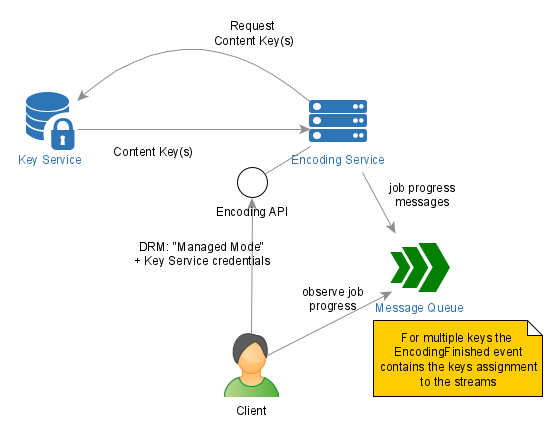
Use the Managed Mode in the following cases:
- You use Axinom Key Service.
- You don’t want to deal with the details of the key generation and exchange.
- You don’t want to "touch" the keys at all (additional level of security).
The managed mode is signalled by setting the "DrmProtection" element to "Managed".
If you encode through the Video Service, the settings described next are already taken care of: the DRM configuration of your environment is applied automatically, and you can skip ahead to Multiple Keys Support. The sections in between are for the case where you compose the job request yourself and post it to the Encoding API.
Alongside "DrmProtection": "Managed", the job request carries a settings element that names your Key Service.
It exists in two shapes - "DrmManagedV2" and "DrmManaged" - because there are two authentication models, not two key services.
"DrmManaged" is the original element: the job request itself carries the Axinom Key Service credentials - tenant ID, management key, and key seed - ideally in encrypted form.
These are the credentials of a DRM configuration managed in the Axinom Portal: you received them in the axinom-drm-configuration.pdf issued with your DRM agreement, and can review them in the Portal, as described under Legacy agreement credentials.
"DrmManagedV2" was introduced together with the Mosaic DRM Service: the Mosaic JWT that submits the job also authorizes the key request, so the element needs no credentials beyond the Key Service URL - which is why it is a separate, slimmer element rather than a variant of the old one.
A job request must contain exactly one of the two, and "DrmManagedV2" is the recommended choice whenever a Mosaic environment is involved.
Using Managed Mode with a Mosaic JWT
You can keep the convenience of the Mosaic DRM workflow while driving encoding from your own code. Set up DRM the same way - enable the Mosaic DRM Service for your environment - and submit the job with a Mosaic JWT, as described under How to authenticate a service account. The Encoding Service passes that token on to the Key Service, which resolves your DRM tenant and its default key seed from it.
The only DRM value the job request needs is the Key Service Management API URL of your environment, which you copy from the DRM Service station in the Management System:
{
    "ContentProcessing": {
        "OutputFormat": ["Cmaf"],
        "DrmProtection": "Managed",
        "DrmManagedV2": {
            "ApiUrl": "<Key Service Management API URL>",
            "MultiKey": false,
            "Proxy": false
        }
    }
}
The table below lists the elements used within the "DrmManagedV2" element.
| Element | Description | Mandatory? | Comments |
|---|---|---|---|
ApiUrl | Axinom Key Service API URL | Mandatory | Copy the Key Service Management API URL from the DRM Service station in the Management System, under Admin Settings. See Service endpoints. |
MultiKey | Multiple key support | Optional, default=false | See Multiple Keys Support below. |
Proxy | Key Service proxy | Optional, default=false | Set to "true" if Key Service Proxy is used (you will also need to set the ApiUrl to point to the Key Service Proxy) |
There are no other DRM values to supply: no tenant ID, no management key, and no key seed. There is therefore nothing to encrypt either, so Credentials Protection does not apply to DRM here.
See Protect a Video for a step-by-step walkthrough.
Using Managed Mode with Axinom DRM Credentials
If you address Axinom Key Service directly - for example because your DRM configuration was created in Axinom Portal, or because the calling system is not part of a Mosaic environment - the Key Service credentials are yours to manage and you pass them in the job request through a "DrmManaged" element.
We recommend the Mosaic workflow described above instead. It needs no credentials in the job request, nothing to encrypt, and no secret to rotate or lose.
All the UUIDs below are just sample values, you need to replace them with your configuration values:
{
    "ContentProcessing": {
        "OutputFormat" : ["Dash", "Hls"],
        "DrmProtection": "Managed",
        "DrmManaged": {
            "ApiUrl": "https://key-server-management.axprod.net/api/",
            "TenantId": "123e4567-e89b-12d3-a456-426614174000",
            "ManagementKey": "123e4567-e89b-12d3-a456-426614174000", // Use the encrypted Key service Management key value
            "KeySeed": "123e4567-e89b-12d3-a456-426614174000", // Use the encrypted Key Seed ID
            "Thumbprints": "Axinom Key Server Production,Axinom Key Server Testing,AxinomKeyServerTesting", // Use the encrypted value
            "MultiKey": false,
            "Proxy": false,
            "KeysProtection": "Encrypted"
        }
    }
}
You can use the Credentials Protection Tool to encrypt credentials.
The table below lists the elements used within the "DrmManaged" element.
| Element | Description | Mandatory? | Comments |
|---|---|---|---|
ApiUrl | Axinom Key Service API URL | Mandatory | You receive it as a part of Axinom DRM configuration. |
TenantId | Axinom Key Service TenantId | Mandatory | You receive it as a part of Axinom DRM configuration. |
ManagementKey | Axinom Key Service Management Key | Mandatory | You receive it as a part of Axinom DRM configuration. |
KeySeed | Key Seed ID from which the keys shall be derived | Mandatory, if Proxy=False | Axinom Key Service supports multiple Key Seeds. You can see the Key Seed IDs in the Axinom DRM configuration. In the proxy mode (Proxy=true), the Key Seed ID must not be set, as the Key Service Proxy has its own logic of selecting a Key Seed. |
Thumbprints | Thumbprints of the Key Service certificates which Encoding should trust | Mandatory | Set always to: "Axinom Key Server Production,Axinom Key Server Testing,AxinomKeyServerTesting" |
MultiKey | Multiple key support | Optional, default=false | See Multiple Keys Support below. |
Proxy | Key Service proxy | Optional, default=false | Set to "true" if Key Service Proxy is used (you will also need to set the ApiUrl to point to the Key Service Proxy) |
KeysProtection | If the secrets in the configuration are encrypted | Optional, default=false | If true, the fields ManagementKey, KeySeed, Thumbprints shall be encrypted as described under Credentials Protection |
You are encouraged to apply Credentials Protection
to the Key Service credentials (fields ManagementKey, KeySeed, Thumbprints).
Encrypt the values and set "KeysProtection": "Encrypted". Eventhough we don’t recommend it, you
can use the unencrypted Key Service credentials (fields ManagementKey, KeySeed, Thumbprints).
In that case, you have to set "KeysProtection": "Unencrypted"
See Axinom Key Service documentation for further details on Key Service Proxy.
Direct Mode
The diagram below visualizes the interactions of the parties involved in the Content Key(s) exchange in the direct mode:
Interactions in the Direct Mode
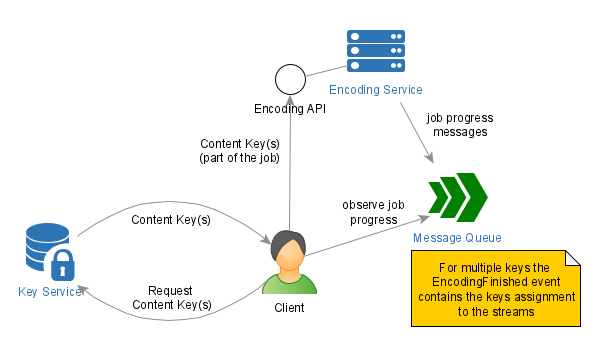
Use the Direct Mode in the following cases:
- You would like to have fine-tuned control over the key generation process
- You decide on the Key ID and store it before the encoding process starts
- You use a Key Service other than the Axinom Key Service
The generated key and related information is passed to the Encoding Service as a part of the ContentProcessing section, e.g.:
{
    "ContentProcessing": {
        ...
        "DrmProtection": "Base64Key",
        "KeyId": "ad0c138e-2591-45c5-94ea-80b3697c6da9",
        "ContentKey": "YWQwYzEzOGUyNTkxNDVjNQ=="
        ...
    }
}
The Key ID is a GUID which uniquely identifies the Content Key and helps the
key assignment to the respective video/stream. Once generated, the Content Key
shall be secured well. There are several possibilities how to include the
Content Key in the job description, signalized by the value of the "DrmProtection" element:
| DrmProtection Value | Description | Comment |
|---|---|---|
Base64Key | ContentKey is included as a plain text, just base64-encoded | This is the least secure option. It is recommended to use it only for development or test scenarios, never in production. |
CertificateEncryptedBase64Key | ContentKey is encrypted with the Encoding Service' certificate. | See Credentials Protection on how to use the certificate to encrypt the passed strings. |
Base64Cpix | ContentKey is included into a CPIX document, base64-encoded. | CPIX is a standardized way of protecting the keys exchange. This is the preferred way to pass the keys to the Encoding Service. Check Key Service documentation for more details and examples of CPIX. Axinom Key Service can provide the keys already as CPIX-documents, so you don’t have to worry about these details if you are using Axinom Key Service. |
You are encouraged to apply Credentials Protection
to the ContentKey, i.e. to use the DRM Protection mode "CertificateEncryptedBase64Key"
instead of "Base64Key". The same example as above for the Encoding Service (West
Europe) would look like:
{
    "ContentProcessing": {
        ...
        "DrmProtection": "CertificateEncryptedBase64Key",
        "CredentialsProtection": "Encrypted",
        "KeyId": "ad0c138e-2591-45c5-94ea-80b3697c6da9",
        "ContentKey": "Ug27o+9Vzr1DU/TNYz0tqiWS6Vt+3d0S1Od0BE51gPPtf5EzMqG+JEP8tTrdV/z2crtJwhPqKeOPkh1ng3qi3U1O2WZ4YJmdiKloDtOYd0hWEB4B84up7u/pLTRZ9WCVyY+2N1SpfhIJ7qaVEDr1ATns44jMWpqmVi0hJbm+j30aKrGiK3hlrNckEdUQxvqnGFgRgIrH08FJioQB1yW6iRwhc05qburSJF2n8uw3kZqhAoVB5j4K3s0YulzCU4dLdeqlOiVfhdwFy0RbWIBYJ7UaKeTMCGvhjUM/8HcXuDYNAnph28GONG2K+cRc6ks+M2vorW6WdliNViIlyDZYLoiYvCZjsTkx9CwdlNCix4PmS9Bd8T+3ukjw6mzh4CDvbDzBCnj4bmOECN8yTcqRz07THqWtYZnAhEkS7jjBRXTxF49Lh9h5Eb4ablvb8gV0DCt6zpZLwNiF2qMpZjADPDJtsHByJ5XJSKyjXH6G83rmdzrjEHtUV8w1iIYqozwl"
        ...
    }
}
You can use the Credentials Protection Tool to encrypt credentials.
CPIX Details
A single CPIX document can contain multiple keys. If this is the case, different keys are used to protect different streams.
Please provide at least as many keys as there are different quality groups in the respective video, max. 5 (Audio, SD, HD, UHD1, UHD2). The EncodingFinished event contains the full list of streams with the exact
assignment of the keys (Key ID) and initialization vectors (IV) to the streams.
CPIX element cpix:ContentKeyUsageRuleList for assigning the keys to the tracks is not supported.
Other limitations:
- No support for per-key custom Widevine/PlayReady PSSH data
- No support for per-key custom HLS media playlist data, EXT-X-KEY for HLS
- A single IV is used for all keys.
Multiple Keys Support
Following the industry’s best practices, the Encoding Service supports encrypting different streams with different Content Keys. This way, a License Service can assign different usage policies to different streams, depending on the video quality group.
Safari needs a player-side polyfill to play multi-key FairPlay content. If you use Shaka Player, see Multi-key FairPlay on Safari.
To use multiple keys, you should provide more than one key to the Encoding Service.
In the managed mode, set MultiKey=true, and the Encoding Service requests all
the needed keys from the Axinom Key Service. In the direct mode, the keys have to
be passed as a part of a CPIX-document, which you can generate yourself
(or acquire from a Key Service). You can read more about
CPIX under DRM documentation.
Currently available keys are assigned based on video quality groups. In addition, one key is assigned to all audio tracks. Note that the Axinom Encoding Service will request enough keys from Axinom Key Service to cover every quality group from this list:
- Audio
- SD
- HD
- UHD1
- UHD2
Read more about the quality groups of streams under Encoding Billing.
Ideally, each video quality group is assigned a separate key. All video representations in the same quality group share the same key. In case there are less keys than quality groups, then higher quality groups are assigned separate keys and lower quality groups share a key. If the CPIX document provides at least two keys, then audio always gets a separate key while all video quality groups share a key.
The Encoding Service will use one key for all audio streams, and distribute the remaining keys among the bitrate groups. Bitrate groups are logical groupings of streams with a similar quality level.
The EncodingFinished event contains the full list of streams with the exact
assignment of the keys (Key ID) and initialization vectors (IV) to the streams.
Currently, the same IV is used for all streams. For CENC output, such as DASH, an 8-bytes IV is used, for CBCS - 16-bytes IV.
Encryption Schemes
Even though all the DRM technologies use AES as the encryption algorithm, there are different encryption schemes, which can make encrypted content incompatible with some of the technologies.
The Encoding Service uses the following encryption schemes:
| Packaging | Encryption scheme |
|---|---|
| DASH | CENC |
| DashOnDemand | CENC |
| HLS | CBCS |
| CMAF | CBCS |
Today, we recommend to use CMAF and CBCS to prepare the content once and to use it with all major DRM technologies.